Today my Windows Server on EC 2 ask me to activate but it failed when activate online.
After some research I found this can help.
1. go to C:\Program Files\Amazon\Ec2ConfigService\Settings\config.xml to change setting Ec2WindowsActivate to Enabled
2. go to service and restart service "Ec2Config"
now problem is gone.
แสดงบทความที่มีป้ายกำกับ Windows Server 2008 R2 แสดงบทความทั้งหมด
แสดงบทความที่มีป้ายกำกับ Windows Server 2008 R2 แสดงบทความทั้งหมด
วันอังคารที่ 25 กุมภาพันธ์ พ.ศ. 2557

วันศุกร์ที่ 8 มิถุนายน พ.ศ. 2555
How to Add Feature Telnet to Windows
For Windows 7 go to Control Panel > Turn Windows features on or off and check on Telnet Client.
 For windows server 2008 R2 Go to Server Manager > Features Summary > Add Features
 Check on Telnet Client and Install


วันพฤหัสบดีที่ 24 พฤษภาคม พ.ศ. 2555
Install PHP 5.4 on Windows Server 2008 R2 or Windows 7
1. Download PHP Thread safe on Non Thread safe it depend on your requirement.

2. Unpackage to folder you like (ex. is C:\php-5.4.3-Win32)

3. Open IIS (After you prepare IIS)
4. Go to Handler Mappings


5. Add Module Mapping
 6. Add Input Like this one
 *Windows 7 If you cannot find FastCgi module see here.
7. On Request Restrictions Set to File only then click OK.
 8. Now time to set php.ini first make php.ini from copy from php.ini.production (or rename it if you don't want any backup) and set by this (this come from this reference)
extension_dir = "C:\php-5.4.3-Win32\ext" (what your directory you set that.)
if has comment in front ";" just delete it like

 log_errors = On
error_log = "C:\php-5.4.3-Win32\temp\php_error.log" (Create folder temp in php folder or whatever you want to keep log file but beware on write or modifiled permission in windows)
cgi.force_redirect = 0
cgi.fix_pathinfo=1
fastcgi.logging = 0
php 5.4 recommend to set timezone before use.
date.timezone = "Asia/Bangkok"
for timezone see list here
for more details see http://php.net/date.timezone
extension_dir = "C:\php-5.4.3-Win32\ext\"
for support Ms SQL Server see
http://pakorosprogramming.blogspot.com/2012/09/php-52-53-54-connected-mssql-with-sqlsrv.html
9. Now time to test for this just create php file in root folder or somewhere and open it for my sample i create phpinfo.php in root folder with code
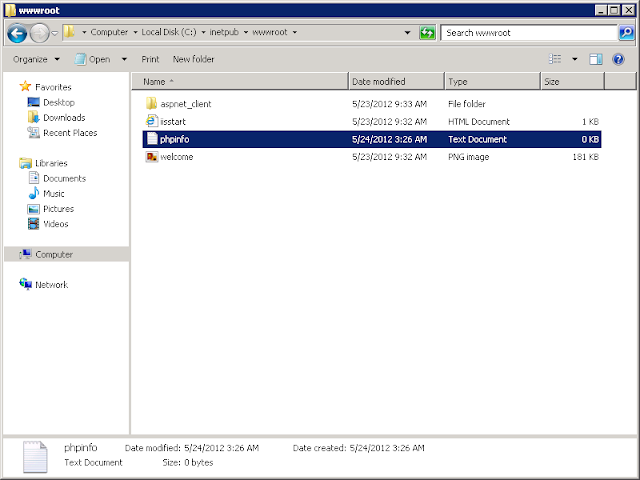
if you have problem to create file php from text file may be set security to show up extension by this
10. Final result.
 If it don't show up try to restart IIS first.

2. Unpackage to folder you like (ex. is C:\php-5.4.3-Win32)

3. Open IIS (After you prepare IIS)
4. Go to Handler Mappings


5. Add Module Mapping


7. On Request Restrictions Set to File only then click OK.

extension_dir = "C:\php-5.4.3-Win32\ext" (what your directory you set that.)
if has comment in front ";" just delete it like

to

error_log = "C:\php-5.4.3-Win32\temp\php_error.log" (Create folder temp in php folder or whatever you want to keep log file but beware on write or modifiled permission in windows)
cgi.force_redirect = 0
cgi.fix_pathinfo=1
fastcgi.logging = 0
php 5.4 recommend to set timezone before use.
date.timezone = "Asia/Bangkok"
for timezone see list here
for more details see http://php.net/date.timezone
extension_dir = "C:\php-5.4.3-Win32\ext\"
for support Ms SQL Server see
http://pakorosprogramming.blogspot.com/2012/09/php-52-53-54-connected-mssql-with-sqlsrv.html
9. Now time to test for this just create php file in root folder or somewhere and open it for my sample i create phpinfo.php in root folder with code

if you have problem to create file php from text file may be set security to show up extension by this
10. Final result.

Prepare Windows Server 2008 R2 for Windows Hosting.
1. Change Computer name for you want to.
2. Add Roles IIS to Server (If you don't have one)
 3. Warning for verify message.
4. Choose Web Server (IIS)
 5. Note message.
 6. Select role services by this list
Static Content, WAS Process Model, Default Document, Directory Browsing, HTTP Errors, HTTP Logging, Logging Tools, Request Monitor, Request Filtering, Static Content Compression, Management Console, WAS Configuration API, ASP.NET, .NET Extensibility, WAS .NET Environment, ISAPI Extensions, ISAPI Filters
This only for asp.net (You can choose another option by try Microsoft Web Platform Installer 3.0)
For Other add CGI, FTP Server for support ftp and php

 And Add Role Service Later for CGI and FTP Server
2. Add Roles IIS to Server (If you don't have one)

4. Choose Web Server (IIS)


Static Content, WAS Process Model, Default Document, Directory Browsing, HTTP Errors, HTTP Logging, Logging Tools, Request Monitor, Request Filtering, Static Content Compression, Management Console, WAS Configuration API, ASP.NET, .NET Extensibility, WAS .NET Environment, ISAPI Extensions, ISAPI Filters
This only for asp.net (You can choose another option by try Microsoft Web Platform Installer 3.0)
For Other add CGI, FTP Server for support ftp and php


วันพุธที่ 23 พฤษภาคม พ.ศ. 2555
Change password policy for Windows Server 2008 R2
1. Type secpol.msc into the Search box.
 2. Navigate to Security Settings > Account Policies > Password Policy. Double click on "Password must meet complexity requirements"
 3. Disabled it


สมัครสมาชิก:
บทความ (Atom)