Today got another Hard time to run some Application in my localhost.
It just simple to make Oracle Provider run by set Enable 32-Bit Applications to True on Application pool advanced settings
but this time my IIS crash and don't know why?.
I just only create new Application Pools and set it to support 32 bit Application.
Go to Windows Logs > System it show Error
"Application pool 'xxx' is being automatically disabled due to a series of failures in the process(es) serving that application pool."
this error not much help My application work fine when run Debug and if use Default Application pool it work fine except can't use Oracle Provider.
After some research I can't find any answer directly but got some clues.
Application Pool Need permission to work too.
In Application Pool in Advanced Settings we have "Process Model > Identity" that it auto generate when create new Application pool. I assume that Identity don't have some permission on something but I don't have time to find about that. so I change Identity to "NetworkService" and the problem is gone.
Hope this help.
แสดงบทความที่มีป้ายกำกับ IIS7 แสดงบทความทั้งหมด
แสดงบทความที่มีป้ายกำกับ IIS7 แสดงบทความทั้งหมด
วันอังคารที่ 13 พฤษภาคม พ.ศ. 2557

วันพุธที่ 4 ธันวาคม พ.ศ. 2556
Allow C# to manager IIS when use Microsoft.Web.Administration
I use reference Microsoft.Web.Administration from
C:\Windows\System32\inetsrv\Microsoft.Web.Administration.dll
to read IIs Status must allow IIS user readable on folder
C:\Windows\System32\inetsrv\config
and to write or change IIS must writable on it.
It can create new user and set to Application pool and allow this user for read and write on above folder.

C:\Windows\System32\inetsrv\Microsoft.Web.Administration.dll
to read IIs Status must allow IIS user readable on folder
C:\Windows\System32\inetsrv\config
and to write or change IIS must writable on it.
It can create new user and set to Application pool and allow this user for read and write on above folder.
วันเสาร์ที่ 8 ธันวาคม พ.ศ. 2555
Logon failure: unknown user name or bad password. (Exception from HRESULT: 0x8007052E)
Another day with hard problem.
Yes I change my password user account today and cannot connected to my ftp.
That only response
Logon failure: unknown user name or bad password. (Exception from HRESULT: 0x8007052E)
Yes cannot do to much about this until i change my password back to old and it work.
Oh God Why?
Yes I change my password user account today and cannot connected to my ftp.
That only response
Logon failure: unknown user name or bad password. (Exception from HRESULT: 0x8007052E)
Yes cannot do to much about this until i change my password back to old and it work.
Oh God Why?
วันอาทิตย์ที่ 2 กันยายน พ.ศ. 2555
Windows 7 IIS With FastCgi
I try to add Module PHP with fastcgi today but cannot find it in Module list.
For make IIS to support FastCgi must install CGI support in
Application Development Features
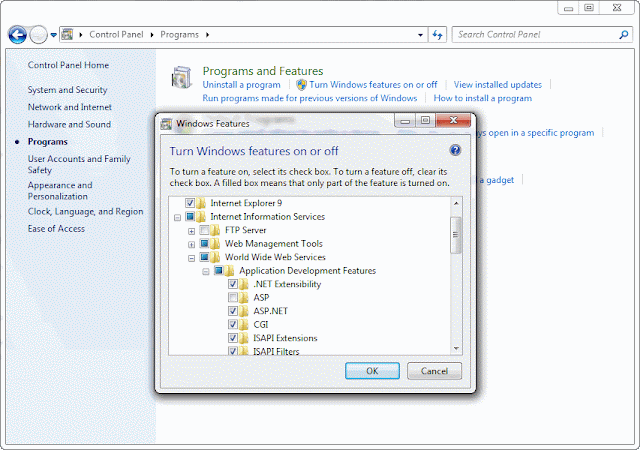
And you will have IIS7 in IIS Panel (If don't see Close IIS and open it again).

For make IIS to support FastCgi must install CGI support in
Application Development Features

And you will have IIS7 in IIS Panel (If don't see Close IIS and open it again).

วันศุกร์ที่ 17 สิงหาคม พ.ศ. 2555
Amazon EC2 IIS7 FTP connected problem.
Already add port 21 to EC2 "Security Group" can connected to my ftp but can't load or upload file (still create directory and delete files)
May be firewall problem but Inbound is already config so what problem?
Yes our EC2 have firewall. to make sure our FTP working please follow this step
http://learn.iis.net/page.aspx/309/configuring-ftp-firewall-settings-in-iis-7/
In "Step 2: Configure the external IPv4 Address for a Specific FTP Site" will show how to configuration FTP Firewall Support
The key is External IP Address of Firewall
use your "Elastic IPs" for this will let you connected your ftp server from outside.
May be firewall problem but Inbound is already config so what problem?
Yes our EC2 have firewall. to make sure our FTP working please follow this step
http://learn.iis.net/page.aspx/309/configuring-ftp-firewall-settings-in-iis-7/
In "Step 2: Configure the external IPv4 Address for a Specific FTP Site" will show how to configuration FTP Firewall Support
The key is External IP Address of Firewall
use your "Elastic IPs" for this will let you connected your ftp server from outside.
วันเสาร์ที่ 29 พฤษภาคม พ.ศ. 2553
HC Controller 8 Install on Windows Server 2008
I try all night to install this but it have error and not work.
So i send support to request install for me
Now anything work fine.
I try to see what different from before and i found
IIS 6 Management Compatibility is Installed (I never think to install this)
This mean Hosting Controller require this feature
to add this feature try to add Roles in Server Manager.
So i send support to request install for me
Now anything work fine.
I try to see what different from before and i found
IIS 6 Management Compatibility is Installed (I never think to install this)
This mean Hosting Controller require this feature
to add this feature try to add Roles in Server Manager.
วันอังคารที่ 29 ธันวาคม พ.ศ. 2552
IIS7 and old asp problem
Yesterday i need to set some asp application on IIS7 (Vista)
and found something (I already install asp component)
If asp have error occur it doesn't show error message and tell me to contact administrator (that's me)
"An error occurred on the server when processing the URL. Please contact the system administrator"
for this go to setting error to show go to root web sites (don't know why set per application not work)
setting in asp
Send Errors To Browser = true
yes after this i see error but it confuse me more
with this word
Active Server Pages error 'ASP 0131'
Disallowed Parent Path
/default.asp, line 1
The Include file '../header.inc' cannot contain '..' to indicate the parent directory.
What this mean yes after research i found IIS7 don't allow parent path for asp by default.
um again.
go to asp setting and set
Enable Parent Paths = true
Yes after this you will see real error come true.
you can use trace your application by Failed Request Tracing Rules for another options about this
and found something (I already install asp component)
If asp have error occur it doesn't show error message and tell me to contact administrator (that's me)
"An error occurred on the server when processing the URL. Please contact the system administrator"
for this go to setting error to show go to root web sites (don't know why set per application not work)
setting in asp
Send Errors To Browser = true
yes after this i see error but it confuse me more
with this word
Active Server Pages error 'ASP 0131'
Disallowed Parent Path
/default.asp, line 1
The Include file '../header.inc' cannot contain '..' to indicate the parent directory.
What this mean yes after research i found IIS7 don't allow parent path for asp by default.
um again.
go to asp setting and set
Enable Parent Paths = true
Yes after this you will see real error come true.
you can use trace your application by Failed Request Tracing Rules for another options about this
วันเสาร์ที่ 15 พฤศจิกายน พ.ศ. 2551
HttpModules กับ IIS 7 ทำไมไม่โหลด Mudule ละค้าบ
ปัญหาใหม่มาละคร้าบ หลังจากที่ เปลี่ยนมาใช้ Windows Vista กะเค้าบ้าง ผลก็คือ โปรแกรมเก่า ที่ทำไว้ ดันใช้ไม่ได้ เนื่องจาก Module ไม่ทำงาน ตอนเริ่มโปรแกรม เลยได้ความรู้ใหม่เลย ซึ่งก็คือ หากอยู่ในโหมด classic application pool
การใช้งาน Modules ก็จะเหมือนเดิมคือ
แต่ถ้าเป็นโหมด Default Application Pool
ก็จะกลายเป็น
ซึ่ง เป็นการใช้ Module ของ IIS 7 ครับ
แถมท้ายด้วยว่า โปรเจ็คที่สร้างจาก Visual Studio 8 กับ Version Express นั้น ตัว dll System.Web.Extension คนละเวอร์ชั่นกันครับ ตัว Express ได้ dll ใหม่กว่าด้วยซ้ำ ผลคือ ต้องสร้างโปรเจ็คใหม่ แล้วเอาโค๊ดของเก่ามาลงอีกรอบ
การใช้งาน Modules ก็จะเหมือนเดิมคือ
แต่ถ้าเป็นโหมด Default Application Pool
ก็จะกลายเป็น
(จริงๆ ตรงนี้มีต่อนะ แต่ขอย่อละกัน...)
ซึ่ง เป็นการใช้ Module ของ IIS 7 ครับ
แถมท้ายด้วยว่า โปรเจ็คที่สร้างจาก Visual Studio 8 กับ Version Express นั้น ตัว dll System.Web.Extension คนละเวอร์ชั่นกันครับ ตัว Express ได้ dll ใหม่กว่าด้วยซ้ำ ผลคือ ต้องสร้างโปรเจ็คใหม่ แล้วเอาโค๊ดของเก่ามาลงอีกรอบ
การป้องกันปัญหาสำหรับ Mudule เพราะไม่รู้ว่าเซิฟที่จะเอาไปลง IIS Version ไหน ก็ใส่ไปทั้งคู่ก็ได้ครับ ไม่เป็นไร ผมลองละ - -'
สมัครสมาชิก:
บทความ (Atom)